
These days, it seems as though everyone has found a time machine and traveled back to the 1980s. But let me tell you, this isn’t just a story—it’s reality. Look around you—college friends, relatives, or even your own siblings—everyone is using AI to create 90s-style photos and uploading them to social media. And creating them is incredibly easy; today, we’ll find out exactly how to create these 1980s AI photos Trend
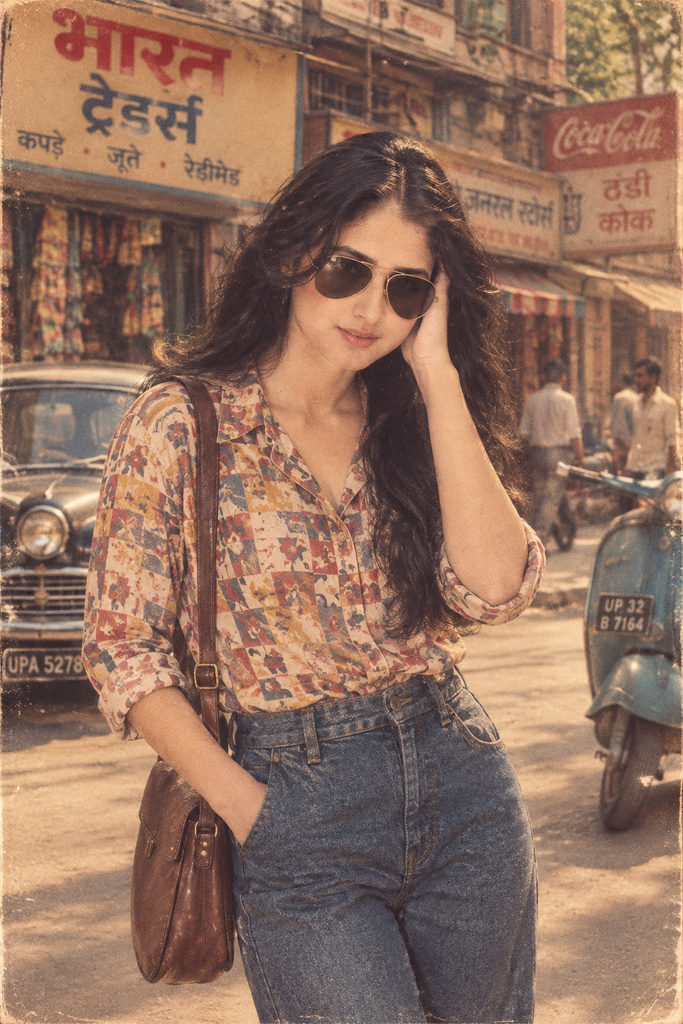
This 1980s AI photo trend is taking over social media statuses everywhere. In this post, I’ll explain how to create this trend and provide everything you need so you won’t face any issues generating these images using AI.
What Is the 1980s AI Photo Trend?
This trend is very simple: you upload a photo of yourself, a friend, or your entire family to an AI tool and use a prompt to select a 1980s style. It then gives your photo a new look, making it appear as though it was actually shot on vintage film.
Imagine wind-swept hair, soft yellow lighting, a gentle softness, and the aesthetic of great artists—complete with that film-like grain texture you simply don’t get with modern smartphone cameras. It recreates the entire image, adjusting everything from your clothing and lighting to the aspect ratio, ensuring that instead of looking like a typical filtered selfie, the photo truly resembles an authentic vintage print to the viewer.
People are creating this with the help of ChatGPT and Gemini—which offer image-generation features—and are also using specific photo apps; however, ChatGPT is the most popular choice because it is free and easy to use.
Why Are 1980s AI Photos Trending?
The first reason is that many social media users grew up looking at their parents’ or grandparents’ old photo albums. Seeing themselves in the same kind of clothes their parents wore at that age brings a strange sense of comfort.It feels like a journey back in time; it evokes your old memories.
Another reason is that they find it fun to share their photos on social media; even if the images appear staged or artificial, people appreciate them because of the emotional connection.
What Does a 1980s AI Photo Look Like?
Before you write a prompt, it helps to know what you’re actually asking for. Most 80s-style AI photos share a handful of visual traits:
- Warm, slightly overexposed lighting, often with a yellow or amber tint
- Visible film grain and a soft, non-HD texture
- Studio backdrops — plain colors, soft gradients, or those swirly marbled backgrounds photo studios used to love
- Big hair, thick eyebrows, high-waisted trousers, oversized collars, and bold prints
- A square or slightly cropped frame, sometimes with a white border like an old print
- Poses that feel a little stiff and formal, the way studio portraits from that era usually were
Once you understand these cues, you can steer your prompts to include or emphasize exactly the details you want.
How to Create a 1980s AI Photo
Here is the actual step-by-step process:
1. Select a good, clear photo of yourself. Ensure the lighting is good, and try to use a solo photo so the image can be generated quickly and easily.
2. Now, open ChatGPT and upload your photo to the chat.
3. Paste the prompt provided below into the chat along with your photo; without this prompt, ChatGPT won’t create the image in the style of the 1980s AI photo trend.
4. Hit generate and watch as your photo is created. If you aren’t happy with the result, you can tell ChatGPT exactly what changes you’d like to make.
That’s all there is to it. The real key lies in how precise your prompt is—and that’s where most people make mistakes (we’ll discuss this more in a moment).
Best 6 1980s AI Photo Trend Prompts
Here are six solid prompts to get you started. Feel free to swap in your own details — clothing color, background, hairstyle — once you’ve got the base structure down.
1. 1980s Indian Street Style
“Turn this photo into a 1980s Indian street-style portrait. Add a vintage film grain texture, warm faded tones, and slightly soft focus. Style the outfit as retro 80s Indian streetwear — think bell-bottom trousers or a printed cotton shirt, aviator sunglasses, and a simple leather sling bag. Place the subject on an old Indian street with vintage shop signboards, an old scooter or Ambassador car in the background, and natural afternoon light.“
2. 1980s Bollywood Look
“Transform this photo into a 1980s Bollywood movie poster style portrait. Give it a dramatic, slightly glamorous studio lighting setup with warm amber tones and visible film grain. Style the hair in a voluminous retro look, add bold vintage makeup, and dress the subject in classic 80s Bollywood fashion — a bright saree or a flared kurta with wide collars. Add a soft, slightly blurred studio backdrop typical of old Hindi film posters.”
3. 80s College/Student Look
“Recreate this photo as a 1980s college yearbook-style portrait. Use a plain gradient studio background in muted blue or maroon. Style the outfit as a retro college look — a collared shirt or sweater, high-waisted jeans, and simple accessories. Add warm, slightly grainy film lighting and a classic straight-on yearbook pose with a gentle smile.”
4. 80s Family Photo
“Turn this into a 1980s-style family studio portrait. Add warm, slightly overexposed lighting, visible film grain, and a plain or marbled studio backdrop popular in old photo studios. Dress everyone in coordinated retro outfits — collared shirts, simple sarees or salwar suits, and neatly combed hairstyles typical of the era. Keep the poses slightly formal, seated or standing close together, the way old family portraits were usually framed.”
5. 80s Bedroom/Studio Portrait
“Convert this photo into a 1980s studio portrait shot in a home bedroom setting. Add warm, soft window light, a slightly grainy film texture, and vintage decor in the background — an old wall clock, patterned curtains, or a wooden dresser. Style the outfit and hair in a relaxed retro 80s look, with a candid but slightly posed feel, like a photo taken with an old film camera at home.”
6. 80s Couple Photo
“Turn this photo into a 1980s couple portrait. Use a soft studio backdrop with warm, romantic lighting and visible film grain. Style both outfits in classic 80s fashion — collared shirts, high-waisted trousers or a flowing saree, and retro hairstyles. Pose the couple close together in a warm, slightly formal stance typical of old studio couple photographs, with a gentle nostalgic expression.”
Common Mistakes to Avoid
When people try this trend for the first time, they might make a few mistakes:
- Being too vague. Prompts like “make it look like the 80s” give the AI almost nothing to work with. Specifying details about clothing, background, and lighting makes a huge difference.
- Using low-quality source photos. Blurry or poorly lit original photos often confuse the AI, resulting in distorted or odd-looking faces.
- Ignoring cues for grain and lighting. Without specifically mentioning film grain and warm tones, the results might look like a modern photo with a random costume rather than an authentic vintage shot.
- Failing to refine the output. The initial result is rarely perfect; requesting minor adjustments almost always improves the final image.
- Overlooking cultural context. If you want a Bollywood or Indian street-style look, state it clearly—generic “80s” prompts often yield Western-style results.
FAQ
Do I need a paid ChatGPT plan for this? Image generation is available in both free and paid plans, though paid plans allow you to generate more images before hitting a limit.
Can I use photos of my entire family? Yes, group photos work well, especially for family portrait prompts. Just ensure that the faces in the original photo are clearly visible.
Why do my results look strange or distorted? This often happens due to low-resolution source photos or overly complex prompts. Try using a clearer photo and simplifying the prompt a bit.
Is this trend popular only in India? No, but the Bollywood and Indian street-style versions have become quite popular in India, whereas the family and studio-portrait versions are popular worldwide.
Can I use these photos for commercial purposes? Generally, they are intended for personal use or casual sharing. If you wish to use AI-generated images commercially, it is best to check the specific terms and conditions of the tool you used.
Conclusion
The 1980s AI photo trend works because it hits a sweet spot — it’s nostalgic, easy to do, and genuinely fun to see come together. You don’t need any design skills, just a decent photo and a prompt detailed enough to guide the AI toward the exact vibe you’re picturing. Try a few of the prompts above, tweak the details to match your own style, and don’t be afraid to regenerate a couple of times until it feels right. That’s really the whole trick.